ImpressArt®: How to Metal Stamp Mandala Patterns

This week’s tutorial from ImpressArt is a popular trend in Mandala metal stamping. A mandala design is a circular shape with geometric patterns.

Here is what you’ll need to start your mandala designs:

  • Mandala Design Stamp Pack: These packs comes with a set of 4 stamps. Combine these stamps endlessly to create intricate jewelry designs. Easily stamp beautiful on-trend mandalas, frames, accents, or borders.
    Here are 4 sets we have: Z018002, Z018004, Z009934, Z009935.
  • Stamp Enamel: An acrylic ink used to darken stamped impressions so your design will be clearly seen. We have this enamel pen in Black, Green, Gold & Brown.
  • Sticker Book Stamp Guides (Z021582): Stamp Guides makes it easy to space out letters, stamp in a straight line or curve, and stamp Mandalas and other intricate patterns
  • 1″ Circle w/ Hole (A019450)

Mandala Necklace Tutorial

Make a DIY necklace with your mandala stamped design!

Check out our other Mandala tutorial!


ImpressArt®: How to Use the Dapping Tool

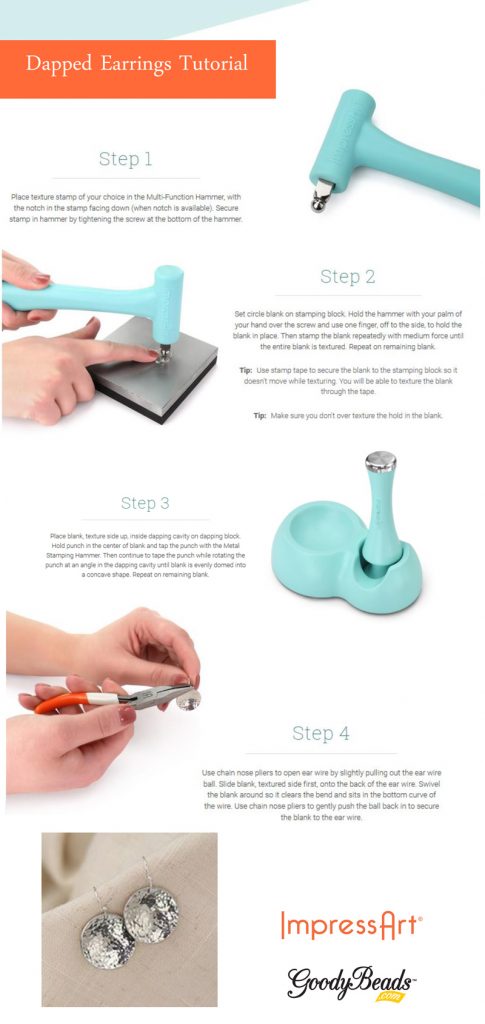
This week’s tutorial from ImpressArt is a simple tutorial on dapping. Turn flat ImpressArt stamping blanks into beautifully domed pieces of jewelry!

Here is what you’ll need to start dapping:

Dapping Tutorial

Tutorial also uses the texturing skill used in last week’s ImpressArt Tutorial.


ImpressArt®: How to Use the Texture Stamping Hammer

This week’s tutorial from ImpressArt is all about metal stamp texturing. Texturing adds an extra dimension of design to your metal blanks. It also adds an organic look for your metal stamping needs. Here are some product you may need to get you started on texturing:

  • Texture Stamper Hammer (TL00266): This innovative tool creates unique, one of a kind textures using your metal stamps as texture heads. You can also interchange the stamping head with this hammer.

Texture Bracelet Tutorial

Using last week’s tutorial on Bracelet Bending, texturize the bracelet blank first before bending the blanks to create a bracelet.


Impress Art®: How Make a Metal Bracelet with the Bracelet Bending Bar Kit

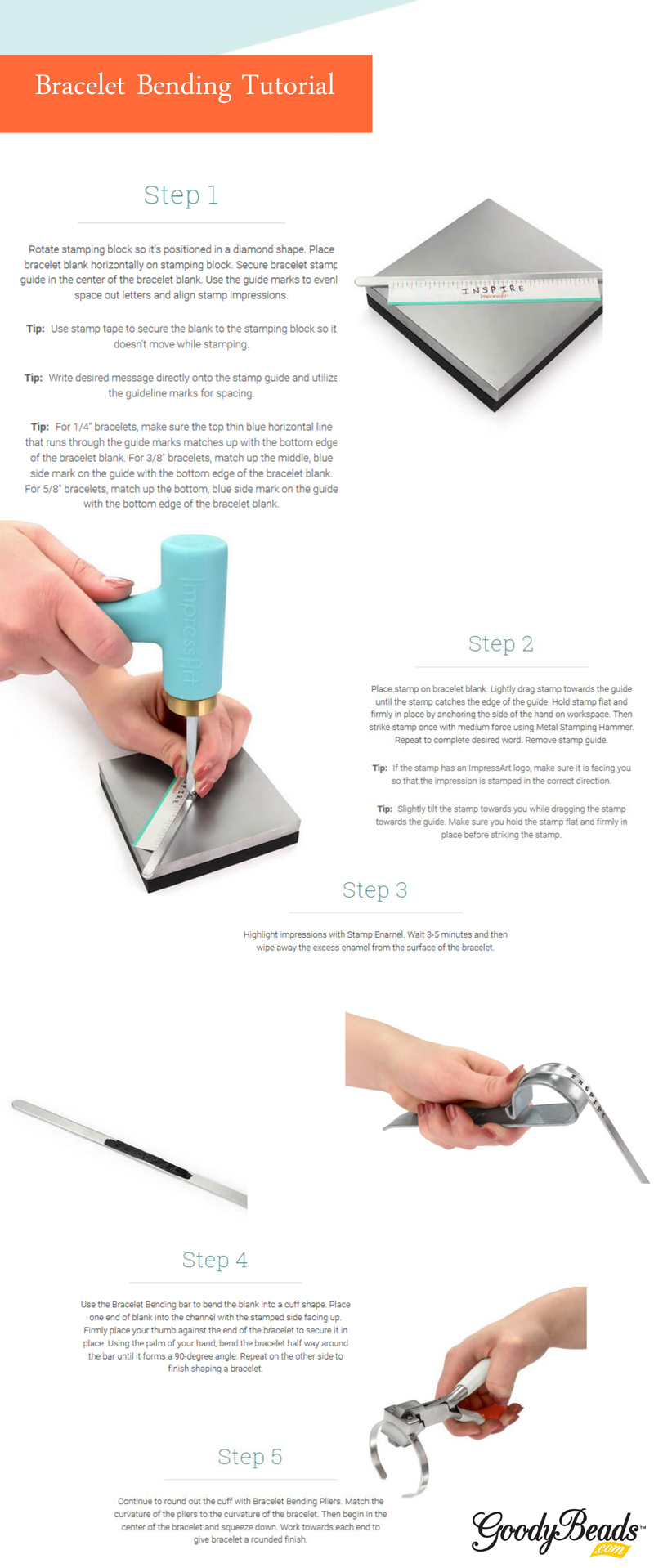
This week’s tutorial from ImpressArt is a simple tutorial on bracelet bending.  See how easy it is to make a bracelet by using the bracelet bending tool.

GB_ImpressArt_BendingBar_tools

Here are some tool you’ll need:

  • Bracelet Guides (Z021583) – This will help to keep your lettering straight when writing names or a simple phrase.
  • Bracelet Bending Pliers (TL00350) – This tool will give you the curve your bracelet will need to obtain a curved shape.
  • Bracelet Bending Bar Kit (TL00352) – This tool is very useful in bending the ends of your bar. Plus, this kit includes (4) 1/4 inch and (4) 38 inch Aluminum Bracelet Blanks.
  • Other Tools: Letters Stamping SetEnamel Marker, Hammer & Steel Block.

Bracelet Bending Tutorial

GB_ImpressArt_BendingBar_tut2


Impress Art®: Stamping Essentials

Our friends at ImpressArt have given us a 5 week roll-out of educational tool knowledge, tips and tutorials. ImpressArt has a whole inventory of tools, guides and metal blanks for metal stamping. Metal stamping is a great tool and skill to use to customize and personalize jewelry and crafts with impressed words and designs. (Note: Though, many of these metal stamping tools are great for imprinting on metal, you can use them for stamping leather too.)


Essential Tools

To get started on customizing with metal stamping, we are starting with stamping essential this week.
GB_ImpressArt

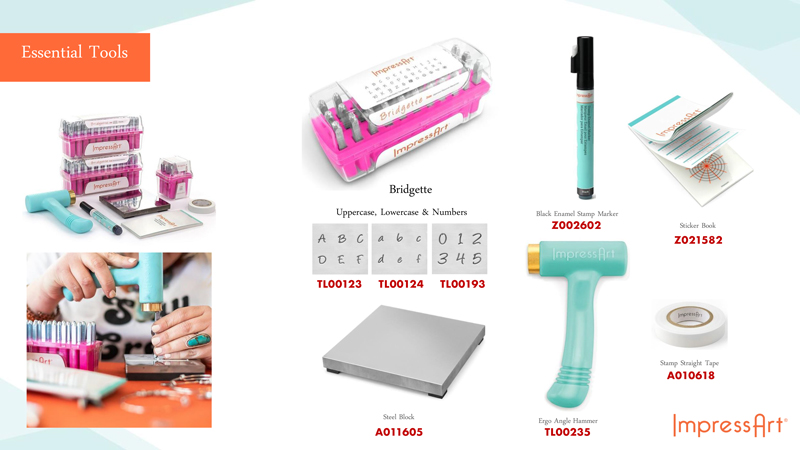
These tools are what you will need to help you start metal stamping:

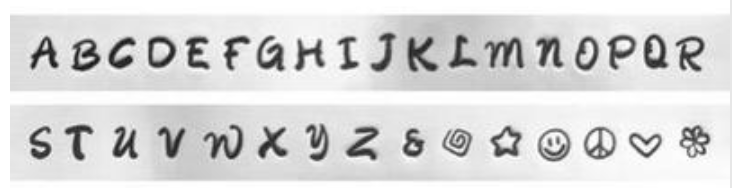
  • Metal Letter Stamping Sets – Great for personalizing jewelry and craft components. Many of these sets will have an Uppercase and Lowercase set, as well as a number set. Plus, there are different font styles you can get. (Item in image is Bridgette Set: TL00123, TL00124, TL00193)
    Screen Shot 2019-12-06 at 9.24.46 AM
    (An example of the stamps you will get with your letter set.)
  • Steel Block (A011605/A014415) : This a hard, stable block that you’ll need to place your stamping blanks to stamp on. This will assist you in giving you a solid impression when you stamp.
  • Ergo Angle Hammer (TL00235): ImpressArt’s Ergo-Angle handle provides ideal positioning for clean, even impressions and it’s one pound head provides optimal weight for deep crisp impressions. It’s short handle design features multiple holding options for maximum control and comfort.
  • Stamping Tape (A010618): A straight guide that allows precise accuracy when stamping letters on metal.
  • Sticker Guide (Z021582): Stamp Guides makes it easy to space out letters, stamp in a straight line or curve, and stamp Mandalas and other intricate patterns.
  • Enamel Stamp Marker (Z002602): Stamp Enamel Marker is an acrylic ink used to darken stamped impressions so your design will be clearly seen. Convenient applicator marker makes highlighting impressions quicker, easier and cleaner.
  • Optional Polishing Cloth (A002371) : Use the polishing cloth to help wipe off excess enamel.


DIY Key Chain Tutorial

Here is a simple DIY Key Chain Tutorial using these essential tools and guides.

GB_ImpressArt_tut3

Here are items suggested in tutorial:  Z014563, MCKR0002, TC02063, TL00123


ImpressArt Texture Stamper Hammer – Video Tutorial

Add texture to your metal stamping jewelry with this Texture Stamper Hammer from ImpressArt. Watch this vendor video and see how simple you can add dimension to your designs!


A perk to ordering the Texture Stamper Hammer (TL00266) is that it comes with the Sprinkle Design Stamp, so you can start using this tool right away when you get it. Plus, with the twist of the handle knob, you can easily switch out different stamps for different designs! The Texture Stamper Hammer is the perfect tool for all skill levels.  So start stamping right away!


Hammer Video Tutorial

Hammer Tool: TL00266